Table of content
Getting Started
Workspace & User Interface
Mastering Cygon
Assets & World Building
Workflow and export
Troubleshooting & Support
Workspace & User Interface
Manage Your Project
The Project Manager serves as the central hub for managing your Cygon Studio projects. It allows you to organize, open, and export your work seamlessly.
Project Manager Guide
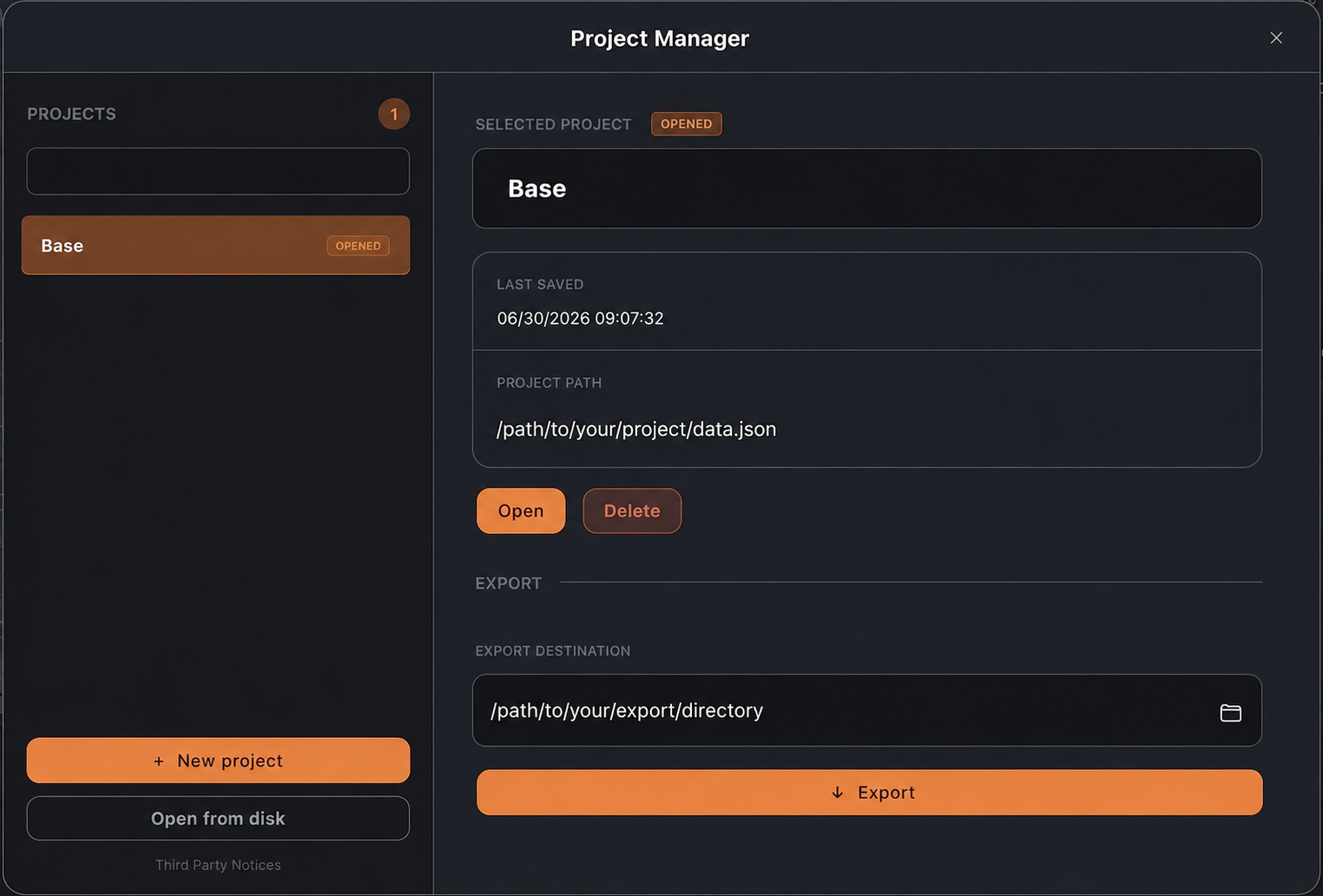
Project List & Navigation
- Overview: Your saved projects are displayed in the sidebar on the left, showing their current status (e.g., "OPEN") and last modified timestamps.
- Quick Search: Use the search bar at the top of the sidebar to quickly locate a specific project by name.
- New Projects: Create a new project by clicking the "+ New Project" button at the bottom of the sidebar.
Project Details
When a project is selected, the main panel displays:
- Project Metadata: The name of the selected project, its last saved date and time, and its local directory path.
- Management Actions: Buttons to Open the selected project or Delete it from your list.
Exportation
- Action: Click the "Exporter" button to initiate the transfer.
(CygonLink Documentation here)
Table of content
Cygon is live
Start building your next environment today
No credit card. No time limit. Your first blockout is 30 minutes away.